
في هذه الصفحة سنرى كيفية جمع وطرح المصفوفات . لديك أيضًا أمثلة ستساعدك على فهم الأمر بشكل مثالي وحل التمارين حتى تتمكن من التدرب عليها. سوف تجد أيضًا جميع خصائص إضافة المصفوفة.
كيفية إضافة وطرح المصفوفات؟
لحساب جمع (أو طرح) مصفوفتين، يجب عليك إضافة (أو طرح) العناصر التي تشغل نفس الموضع في المصفوفات.
أمثلة:
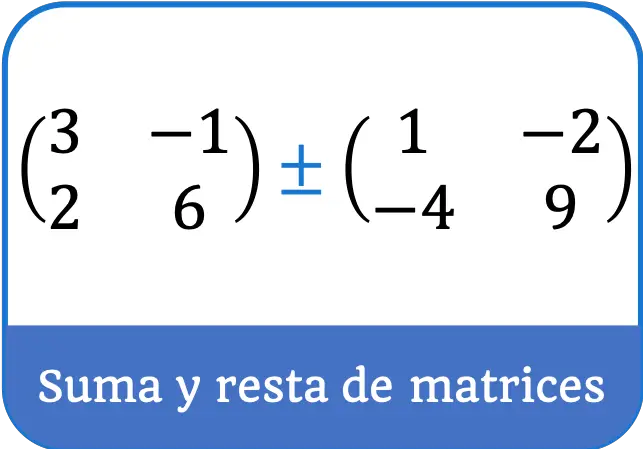
لاحظ أنه لإضافة أو طرح مصفوفتين، يجب أن يكون لهما نفس البعد. على سبيل المثال، لا يمكن إضافة المصفوفات التالية لأن الأولى مصفوفة 2×2 والثانية مصفوفة 3×2:
![\displaystyle \begin{pmatrix} 1 & 3 \\[1.1ex] 0 & 2 \end{pmatrix} + \begin{pmatrix} 5 & 6 \\[1.1ex] -2 & 4 \\[1.1ex] 7 & 1 \end{pmatrix} \ \longleftarrow \ \color{red} \bm{\times}}](https://mathority.org/wp-content/ql-cache/quicklatex.com-082c648e15685c4ddeac2cc2da502d96_l3.png "Rendered by QuickLaTeX.com")
حل تمارين جمع وطرح المصفوفات
التمرين 1
احسب المجموع التالي لمصفوفات 2×2:
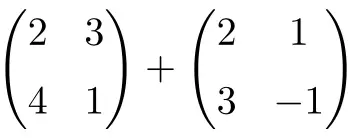
وهي عبارة عن مجموع مصفوفتين مربعتين أبعادهما 2×2:
![\displaystyle \begin{pmatrix} 2 & 3 \\[1.1ex] 4 & 1 \end{pmatrix} + \begin{pmatrix} 2 & 1 \\[1.1ex] 3 & -1 \end{pmatrix} = \begin{pmatrix} 2+2 & 3+1 \\[1.1ex] 4+3 & 1+(-1) \end{pmatrix} = \begin{pmatrix} \bm{4} & \bm{4} \\[1.1ex] \bm{7} & \bm{0} \end{pmatrix}](https://mathority.org/wp-content/ql-cache/quicklatex.com-1d9428ad89a6bd149d5e63bc500879ac_l3.png "Rendered by QuickLaTeX.com")
تمرين 2
قم بإجراء عملية طرح المصفوفة التالية:
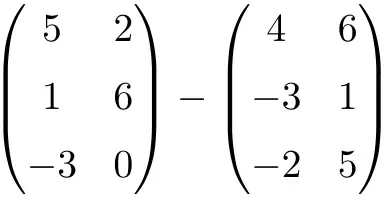
وهو طرح مصفوفتين البعد 3×2:
![\displaystyle \begin{pmatrix} 5 & 2 \\[1.1ex] 1 & 6 \\[1.1ex] -3 & 0 \end{pmatrix} - \begin{pmatrix} 4 & 6 \\[1.1ex] -3 & 1 \\[1.1ex]-2 & 5 \end{pmatrix} = \begin{pmatrix} 5-4 & 2-6 \\[1.1ex] 1-(-3) & 6-1 \\[1.1ex] -3-(-2) & 0-5 \end{pmatrix} = \begin{pmatrix} \bm{1}& \bm{-4} \\[1.1ex] \bm{4} & \bm{5} \\[1.1ex] \bm{-1} & \bm{-5} \end{pmatrix}](https://mathority.org/wp-content/ql-cache/quicklatex.com-c371e1f01df59f4b8abb018e476e66d7_l3.png "Rendered by QuickLaTeX.com")
التمرين 3
أوجد نتيجة مجموع المصفوفة التالية للبعد 3×3:
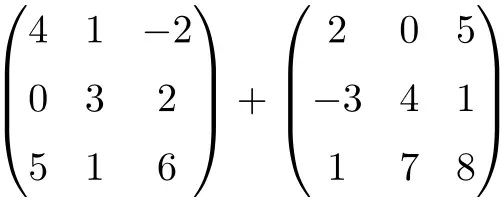
وهي عبارة عن مجموع مصفوفتين مربعتين من الرتبة 3×3:
![\displaystyle \begin{pmatrix} 4 & 1 & -2 \\[1.1ex] 0 & 3 & 2 \\[1.1ex] 5 & 1 & 6 \end{pmatrix} + \begin{pmatrix} 2 & 0 & 5 \\[1.1ex] -3 & 4 & 1 \\[1.1ex] 1 & 7 & 8 \end{pmatrix} = \begin{pmatrix} 4+2 & 1+0 & -2+5 \\[1.1ex] 0+(-3) & 3+4 & 2+1 \\[1.1ex] 5+1 & 1+7 & 6+8 \end{pmatrix} = \begin{pmatrix} \bm{6}& \bm{1} & \bm{3} \\[1.1ex] \bm{-3} & \bm{7} & \bm{3} \\[1.1ex] \bm{6} & \bm{8} & \bm{14} \end{pmatrix}](https://mathority.org/wp-content/ql-cache/quicklatex.com-280299cb0b37e1a585466c4570439ec4_l3.png "Rendered by QuickLaTeX.com")
التمرين 4
احسب الجمع والطرح التالي للمصفوفات المربعة من الرتبة 2:
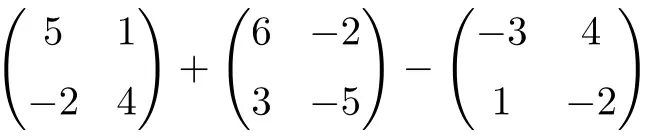
إنها عملية مقترنة بالجمع والطرح للمصفوفات المربعة من الرتبة 2:
![\displaystyle \begin{pmatrix} 5 & 1 \\[1.1ex] -2 & 4 \end{pmatrix} + \begin{pmatrix} 6 & -2 \\[1.1ex] 3 & -5 \end{pmatrix} -\begin{pmatrix} -3 & 4 \\[1.1ex] 1 & -2 \end{pmatrix}](https://mathority.org/wp-content/ql-cache/quicklatex.com-c9fa4dba7699c0035ce5081756b4f62e_l3.png "Rendered by QuickLaTeX.com")
لذا، نقوم أولاً بإضافة المصفوفات الموجودة على اليسار:
![\displaystyle \begin{pmatrix} 11 & -1 \\[1.1ex] 1 & -1 \end{pmatrix} -\begin{pmatrix} -3 & 4 \\[1.1ex] 1 & -2 \end{pmatrix}](https://mathority.org/wp-content/ql-cache/quicklatex.com-e1544e4da9d5ad2ea3ec2e4ad0326023_l3.png "Rendered by QuickLaTeX.com")
ثم نحسب طرح المصفوفات:
![\displaystyle \begin{pmatrix} \bm{14} & \bm{-5} \\[1.1ex] \bm{0} & \bm{1} \end{pmatrix}](https://mathority.org/wp-content/ql-cache/quicklatex.com-bd7f32fc7c9429fdfc3b5b745e85975c_l3.png "Rendered by QuickLaTeX.com")
التمرين 5
حل مصفوفة الجمع والطرح التالية:
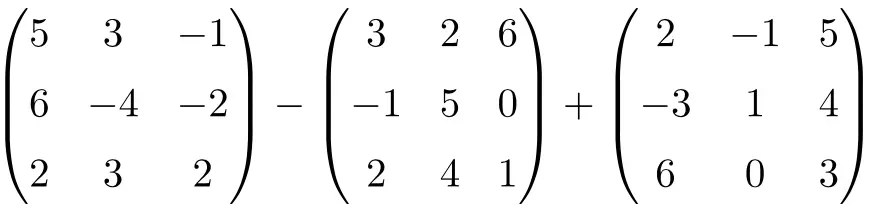
إنها عملية مشتركة للطرح والجمع للمصفوفات المربعة من الرتبة 3:
![\displaystyle \begin{pmatrix}5 & 3 & -1 \\[1.1ex] 6 & -4 & -2 \\[1.1ex] 2 & 3 & 2 \end{pmatrix}-\begin{pmatrix} 3 & 2 & 6 \\[1.1ex]-1 & 5 & 0 \\[1.1ex] 2 & 4 & 1 \end{pmatrix} + \begin{pmatrix}2 & -1 & 5 \\[1.1ex] -3 & 1 & 4 \\[1.1ex] 6 & 0 & 3 \end{pmatrix}](https://mathority.org/wp-content/ql-cache/quicklatex.com-ae66268adcd61258654056815542cf58_l3.png "Rendered by QuickLaTeX.com")
أولاً، نحل عملية طرح المصفوفات:
![\displaystyle \begin{pmatrix}2 & 1 & -7 \\[1.1ex] 7 & -9 & -2 \\[1.1ex] 0 & -1 & 1 \end{pmatrix}+\begin{pmatrix}2 & -1 & 5 \\[1.1ex] -3 & 1 & 4 \\[1.1ex] 6 & 0 & 3 \end{pmatrix}](https://mathority.org/wp-content/ql-cache/quicklatex.com-4401b28babce2beaaa6f840c4ed8c959_l3.png "Rendered by QuickLaTeX.com")
وأخيرا نضيف المصفوفات:
![\displaystyle \begin{pmatrix} \bm{4} & \bm{0} & \bm{-2} \\[1.1ex] \bm{4} & \bm{-8} & \bm{2} \\[1.1ex] \bm{6} & \bm{-1} & \bm{4} \end{pmatrix}](https://mathority.org/wp-content/ql-cache/quicklatex.com-ffba1ade3d98c434960b54fc0c7ffe1f_l3.png "Rendered by QuickLaTeX.com")
الآن بعد أن عرفت كيفية جمع المصفوفات وطرحها، فقد حان الوقت لمعرفة كيفية ضرب المصفوفات ، وهي بالتأكيد أهم عمليات المصفوفات. ستجد أيضًا تمارين حل المصفوفات خطوة بخطوة بحيث يمكنك التدرب عليها، كما هو الحال في جميع صفحات هذا الموقع. 😉
إضافة خصائص المصفوفة
تتميز إضافة المصفوفة بالخصائص التالية:
- إضافة المصفوفة لها الخاصية التبادلية :

وبالتالي، فإن الترتيب الذي نضيف به المصفوفات هو نفسه. لتوضيح ذلك، سوف نقوم بإضافة مصفوفتين عن طريق تغيير ترتيبهما وسترى كيف أن النتيجة هي نفسها.
لذلك ننتقل إلى إضافة مصفوفتين بترتيب معين:
![\displaystyle \begin{pmatrix} 1 & 3 \\[1.1ex] 2 & -1 \end{pmatrix} + \begin{pmatrix} 4 & 1 \\[1.1ex] 5 & 2 \end{pmatrix}= \begin{pmatrix} \bm{5} & \bm{4} \\[1.1ex] \bm{7} & \bm{1} \end{pmatrix}](https://mathority.org/wp-content/ql-cache/quicklatex.com-a7eb454436dc3268ae8d6d2b62f395a7_l3.png "Rendered by QuickLaTeX.com")
لاحظ أنه إذا عكسنا ترتيب جمع المصفوفات، تبقى النتيجة كما هي:
![\displaystyle \begin{pmatrix} 4 & 1 \\[1.1ex] 5 & 2 \end{pmatrix} + \begin{pmatrix} 1 & 3 \\[1.1ex] 2 & -1 \end{pmatrix}= \begin{pmatrix} \bm{5} & \bm{4} \\[1.1ex] \bm{7} & \bm{1} \end{pmatrix}](https://mathority.org/wp-content/ql-cache/quicklatex.com-c1e9cd77bc490913ed30ff63815da355_l3.png "Rendered by QuickLaTeX.com")
- خاصية أخرى لجمع المصفوفات هي خاصية العنصر المقابل:

بمعنى آخر، إذا أضفنا مصفوفة بالإضافة إلى نفس المصفوفة ولكن مع تغير جميع عناصرها، ستكون النتيجة مصفوفة صفرية:
![\displaystyle \begin{pmatrix} 4 & 1 & -3 \\[1.1ex] 2 & 0 & 9 \end{pmatrix} + \begin{pmatrix} -4 & -1 & 3 \\[1.1ex] -2 & 0 & -9 \end{pmatrix} = \begin{pmatrix} \bm{0} & \bm{0} & \bm{0} \\[1.1ex] \bm{0} & \bm{0} & \bm{0} \end{pmatrix}](https://mathority.org/wp-content/ql-cache/quicklatex.com-add832e83fe554143cbd4c710315c1c0_l3.png "Rendered by QuickLaTeX.com")
- تحتوي إضافة المصفوفة أيضًا على خاصية العنصر المحايد:

هذه الخاصية هي الأكثر وضوحًا، فهي تشير إلى أن أي مصفوفة بالإضافة إلى مصفوفة مليئة بالأصفار تعادل نفس المصفوفة:
![\displaystyle \begin{pmatrix} 2 & 1 & 5 \\[1.1ex] -3 & 4 & 9 \\[1.1ex] 1 & 12 & 6 \end{pmatrix} + \begin{pmatrix} 0 & 0 & 0 \\[1.1ex] 0 & 0 & 0 \\[1.1ex] 0 & 0 & 0 \end{pmatrix} = \begin{pmatrix} \bm{2} & \bm{1} & \bm{5} \\[1.1ex] \bm{-3} & \bm{4} & \bm{9} \\[1.1ex] \bm{1} & \bm{12} & \bm{6} \end{pmatrix}](https://mathority.org/wp-content/ql-cache/quicklatex.com-ac7b0ba246075c196188798be2c6a034_l3.png "Rendered by QuickLaTeX.com")
- إضافة المصفوفة لها الخاصية الترابطية:

ومن ثم، فإن الترتيب الذي نضيف به المصفوفات هو نفسه. انظر إلى المثال التالي، حيث جمعنا 3 مصفوفات بترتيب مختلف وكانت النتيجة واحدة:
![\displaystyle A = \begin{pmatrix} 2 \\[1.1ex] 1 \end{pmatrix} \qquad B = \begin{pmatrix} 4 \\[1.1ex] -1 \end{pmatrix} \qquad C = \begin{pmatrix} 3 \\[1.1ex] 0 \end{pmatrix}](https://mathority.org/wp-content/ql-cache/quicklatex.com-bae8e10bca43351f3a84f83bfe50ab55_l3.png "Rendered by QuickLaTeX.com")
![\begin{aligned}\left( A + B \right) + C & =\left( \begin{pmatrix} 2 \\[1.1ex] 1 \end{pmatrix} + \begin{pmatrix} 4 \\[1.1ex] -1 \end{pmatrix} \right) + \begin{pmatrix} 3 \\[1.1ex] 0 \end{pmatrix} \\[2ex] & = \begin{pmatrix} 6 \\[1.1ex] 0 \end{pmatrix} + \begin{pmatrix} 3 \\[1.1ex] 0 \end{pmatrix} \\[2ex] & =\begin{pmatrix} \bm{9} \\[1.1ex] \bm{0} \end{pmatrix} \end{aligned}](https://mathority.org/wp-content/ql-cache/quicklatex.com-2cc2b7a14cacc7e403cd729cd863d309_l3.png "Rendered by QuickLaTeX.com")
![\begin{aligned} A + \left( B + C \right) & = \begin{pmatrix} 2 \\[1.1ex] 1 \end{pmatrix} + \left( \begin{pmatrix} 4 \\[1.1ex] -1 \end{pmatrix} +\begin{pmatrix} 3 \\[1.1ex] 0 \end{pmatrix} \right) \\[2ex] & = \begin{pmatrix} 2 \\[1.1ex] 1 \end{pmatrix} + \begin{pmatrix} 7 \\[1.1ex] -1 \end{pmatrix} \\[2ex] & = \begin{pmatrix} \bm{9} \\[1.1ex] \bm{0}\end{pmatrix} \end{aligned}](https://mathority.org/wp-content/ql-cache/quicklatex.com-7ab1f88e74b139451eccb0471988c3db_l3.png "Rendered by QuickLaTeX.com")